How Do I Find Out Which LEGO Pieces Are Missing?
To find out which pieces a LEGO set is missing, check the pieces you have against the set's complete parts list, marking off each one until only the gaps remain. This is essential when you've bought a used or bulk lot and want to rebuild the set, complete it, or sell it as complete — and it's far faster with an inventory than with the instructions.
Here's how it's usually done.
Sort against the instructions
Build the set following the instructions and note anything you run out of.
- Good for: sets you intend to build anyway.
- Falls down on: instructions show steps, not a tidy inventory. You only discover a missing piece when you reach the step that needs it, and counting spares and duplicates is fiddly.
Tick off a printed parts list
Print the set's full inventory and check pieces against it by hand.
- Good for: a complete, accurate count without building.
- Falls down on: a long set has hundreds of lines. Keeping a paper tally across several sessions, and re-totalling what's still missing, is slow and easy to lose track of.
The easy way: Afolio's parts checklist
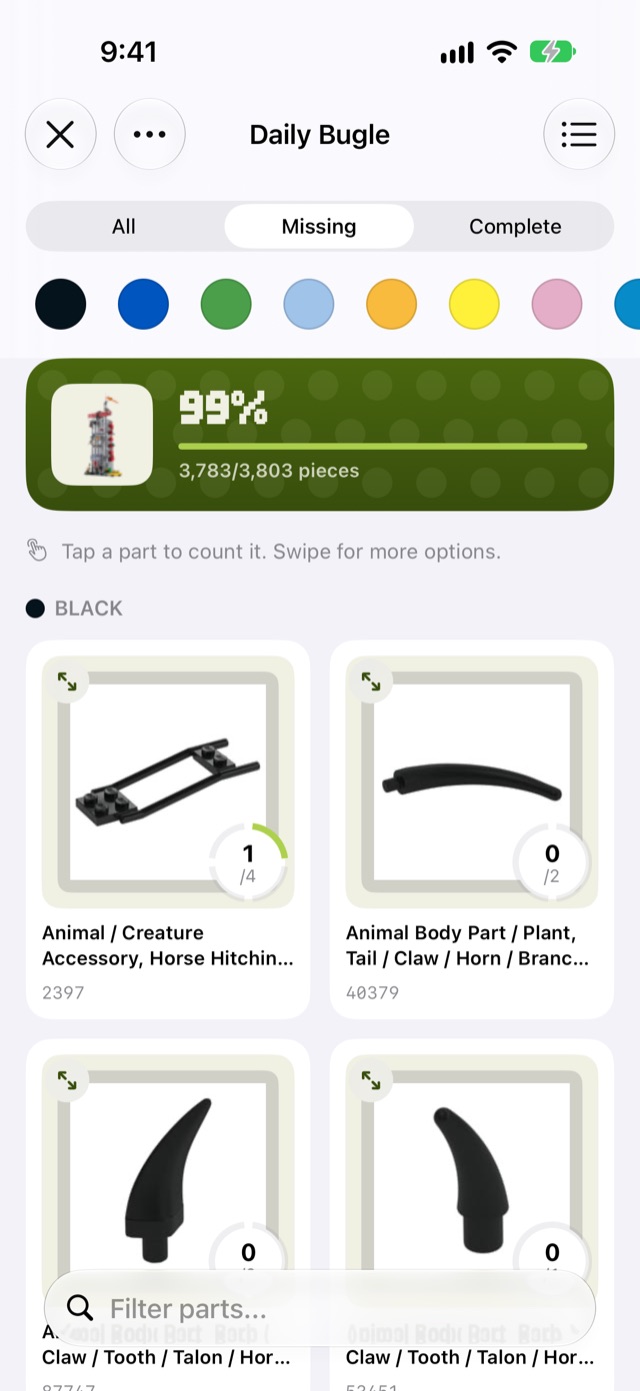
Every set in Afolio has a built-in parts checklist: the complete inventory of that set, with pictures, ready to tick off. It's included in the free version for every set in your collection. Open a set, go to its Inventory tab, and choose Parts Checklist.
On iPhone and iPad
The checklist fills the screen, which suits sorting at the table with the phone or iPad propped beside the pile.
- Tap a part to count one more. The ring next to it fills as you go and becomes a check mark when that part is complete.
- Swipe right to mark a part complete, or swipe left to take one away.
- Enlarge a part to see it clearly, with big + and − buttons for counting a pile of similar pieces.
- Switch between a compact list and a grid of larger pictures.
- Use Missing to show only the pieces you still need, tap colour swatches to narrow by colour, or search by name or number.
- Sets you've started appear under Parts In Progress on the iPhone home screen and in the iPad sidebar, so you can pick up where you left off.
On the Mac
The checklist opens in its own window so you can work alongside the rest of the app. Click + and − to log how many of each piece you have, and a completion ring shows your overall progress. To find the gaps fast, you can:
- Filter to "Missing only" so only the pieces you still need are shown
- Filter by colour or category, or search by name or number, to sort a pile efficiently
- Group by colour or category to match how you've sorted your bricks physically
- Click any part image to enlarge it, and right-click to copy its part number
Your progress syncs through iCloud, so you can count on your iPad at the table and see the result on your Mac.
Minifigure parts are included, and if a set has two of the same minifig the quantities are doubled for you.
Can I print a list of the missing pieces?
Yes, on the Mac. When you're done counting, click Print Missing and Afolio generates a formatted list of everything you still need, with part images, names, colours, and quantities. Take it to a LEGO store's pick-a-brick wall, or use the part numbers to order the exact pieces from a marketplace online. On iPhone and iPad there's no printout; the Missing filter shows the same list on screen.
Not sure which set the loose pile even belongs to? Start with how to identify a LEGO set. Stuck on a single mystery piece? See how to identify a LEGO part.
Try it yourself
Afolio tracks your LEGO collection on Mac, iPhone and iPad, with free iCloud sync between them. It's free for up to 25 sets, and Pro is a one-time upgrade with no subscription.

Prefer not to use the Mac App Store? Download the Mac version directly.
Home
·
Guides
·
Help
·
Pricing
© The Half Bakery Pty Ltd
LEGO is a trademark of the LEGO Group, which does not sponsor or endorse this app.